Safety
Personal Minimums: A Go/No-Go Check You Will Actually Run
November 10, 2026 · 9 min read · by Vincent Wu, Founder, Ascent EFB
Covers features arriving in Ascent 1.9.6. The App Store build today is 1.8.
Try Ascent EFB
Free for 30 days, then $59.99 your first year
One plan with everything in it: 3D terrain, geo-referenced FAA charts, the full weather stack and live traffic, all cached offline. $89.99 a year after the first. One trial per account, no card needed to look around.
Start a 30-day trialBy Vincent Wu, founder of Ascent EFB. Last updated November 10, 2026.
TL;DR: Personal minimums are limits you set for yourself, tighter than the regulations, based on your recent experience and your airplane. The FAA publishes a Personal Minimums Checklist organized around PAVE: Pilot, Aircraft, enVironment, External pressures. Fill it in at home with real numbers, then compare every flight against it, using the forecast for when you will actually be there. Writing the numbers down is easy. Checking them every time is the hard part. Ascent 1.9.6 adds a beta go/no-go card in Copilot that runs the comparison when you ask. It is advisory: you decide as pilot in command.
What are personal minimums, and how do you use them for a go/no-go decision?
Personal minimums are pilot-set limits stricter than the regulations, sized to your current skill and your aircraft. Write them down on the ground, organized by PAVE, then compare each planned flight against them before you go. If any item is past a limit, the answer is no-go or a changed plan. The FAA checklist says marginal items in two or more risk categories mean do not go.
Why personal minimums exist
The regulations tell you what is legal. They do not tell you what is safe for you, this month, in this airplane.
The FAA's Pilot's Handbook of Aeronautical Knowledge makes the point with one example. The flight manual may list a maximum crosswind component of 15 knots, but if your experience is 10 knots of direct crosswind, exceeding 10 could be unsafe. The 15 is a fact about the airplane. The 10 is a fact about you, and it is the one that applies.
Personal minimums are also a decision made before any pressure exists. At the FBO on Sunday afternoon, with passengers waiting, nobody judges 9 gusting 17 well. At home on a quiet evening, you do.
The FAA checklist, organized by PAVE
PAVE, from chapter 2 of the PHAK, splits the risks of a flight into four piles so you look at each, not only at the weather. The FAA's Personal Minimums Checklist, printed as Appendix D of the Aviation Instructor's Handbook (FAA-H-8083-9), turns those piles into blanks:
| PAVE category | What the checklist asks you to set |
|---|---|
| Pilot | Recent takeoffs and landings, hours in make and model, instrument approaches, sleep, alcohol, medication, illness, stress |
| Aircraft | Fuel reserves for VFR and IFR, day and night; experience in type; performance margin, including density altitude |
| Environment | Crosswind as a % of the POH maximum; runway length as a % more than the POH; maximum age of reports and forecasts; VFR ceiling and visibility, day and night; IFR margins above approach minimums |
| External pressures | Allowance for delays, a diversion or cancellation plan, how important the trip is |
Three instructions on that form deserve to be taken literally. Use it at home when you start planning and again just before your final decision to fly. If you have marginal items in two or more categories, do not go. And never loosen your minimums while planning a specific flight, because that is exactly when external pressure does the editing.
How to set the numbers
Start from where you are, not where you would like to be. For each line, ask what the worst condition is that you have handled well, recently, in this airplane, and set the minimum a margin inside it.
| Minimum | How to pick a starting number |
|---|---|
| Ceiling | Well above the basic VFR floor, with a higher number for night |
| Visibility | Comfortably above the legal minimum, which is a floor, not a target |
| Crosswind | The most you have landed comfortably in recent months, gusts included, never above the POH value |
| Gust spread | Gust minus steady wind; gusty days punish the flare more than the steady component suggests |
| Density altitude | The highest you have actually flown from, at your usual load |
| Fuel reserve | Above the 14 CFR 91.151 VFR floor of 30 minutes day and 45 minutes night |
| Night | Yes or no, based on recent night landings, not the date on your certificate |
| IMC | No unless instrument rated and current, and then with margins above approach minimums |
| Runway margin | A safety factor over POH takeoff and landing distance over a 50 ft obstacle |
A CFI who has flown with you recently is the best sanity check; the FAA form has a "Reviewed with" line for it.
Runway margin, worked through
14 CFR 91.103 requires you, before any flight, to become familiar with runway lengths at airports of intended use and with takeoff and landing distance information. The POH gives you the distance. It does not give you the margin.
POH numbers come from new airplanes flown by test pilots in controlled conditions. AOPA's Air Safety Institute has long recommended adding 50 percent to POH takeoff and landing distances, a factor of 1.5. Some pilots choose more, especially early on or in an older airplane. The FAA form leaves the blank empty on purpose: runway length, some percent more than POH. It is your choice, not a regulation.
Take the POH distance over a 50 ft obstacle for your weight, pressure altitude and temperature, no headwind credit, multiply by your factor, and compare with runway available.
| POH takeoff over 50 ft | Runway available | Margin | Needed at 1.5x | Needed at 1.7x | |
|---|---|---|---|---|---|
| Example | 1,715 ft | 2,441 ft | 1.42x | 2,573 ft | 2,916 ft |
The airplane will probably make it on a good day, which is exactly the reasoning the margin exists to stop. Lighten the load, wait for a cooler hour, or pick a longer runway.
The problem: a worksheet nobody re-reads
Most pilots filled in a personal minimums worksheet once, in training, and it now lives in a flight bag pocket. The failure modes are mundane. You compare against the current METAR instead of the forecast for your arrival. You forget the alternate. You never run the crosswind math for the runway you will use. And the more important the trip, the more likely the check quietly does not happen, which the FAA form calls out under Importance of Trip.
A minimum you do not check is not a minimum. It is a good intention.
Making the check run every flight
Attach the check to something you already do every time.
- Tie it to the briefing. No filing and no final brief until the minimums comparison is done.
- Use the forecast window. Departure around your ETD, destination and alternates around your ETA.
- Treat missing data as a no. No TAF for the destination is not good weather. It is unknown weather.
- Count categories. One marginal item is a caution. Marginal items in two PAVE categories is the FAA's do not go.
- Write the margin down. "1.42x against 1.7x" on the kneeboard is harder to argue with than "should be fine."
- Review on a calendar. Tighten after a layoff. Loosen only after training, never on the day of a flight.
How Ascent 1.9.6 runs the check (beta)
Copilot reaches every Pro account in Ascent 1.9.6 and is labelled Beta. The App Store build today is 1.8, so it is not available to download yet.
Setup is a short walkthrough. Pick the preset closest to your experience (VFR student, new private pilot, experienced VFR or instrument rated), then adjust each limit: ceiling, visibility, crosswind with gusts, gust spread, density altitude, fuel reserve on landing, night, IMC and runway margin. A limit you leave blank is reported as not set, never as passed.
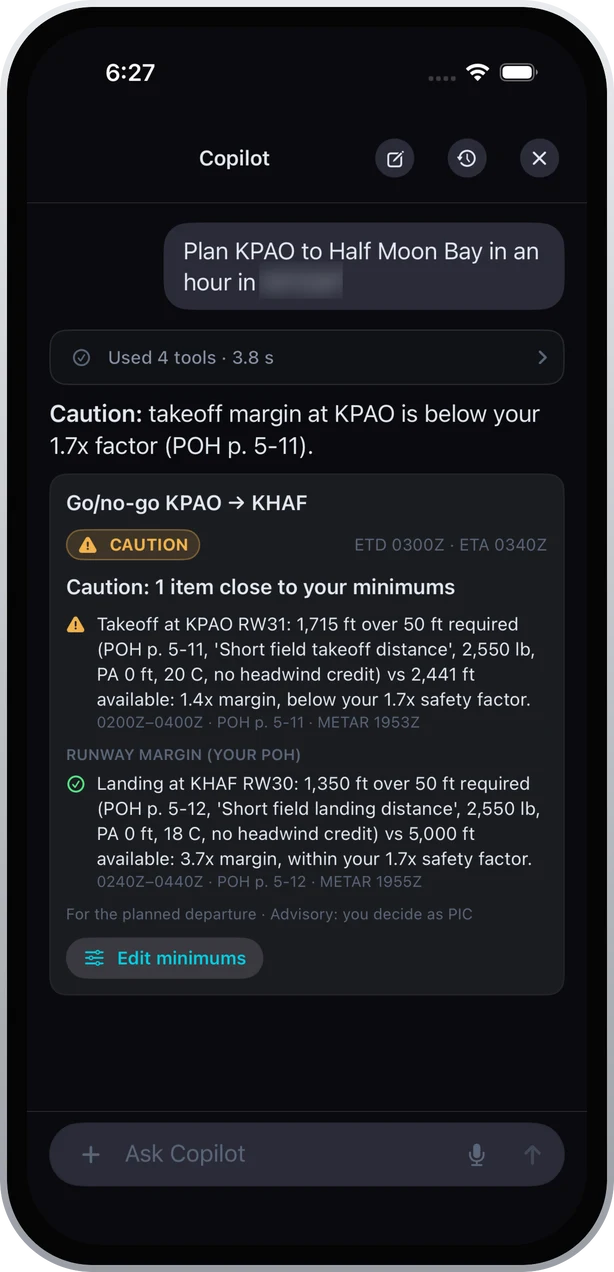
Then ask, by voice or text: "plan KPAO to Half Moon Bay in an hour." Copilot answers with a go/no-go card. The verdict is go, caution, no-go, or unable to check, and each problem is named with its airport and time window. Departure is checked around ETD, destination and alternates around ETA, from METAR and TAF.
A demo plan. Takeoff at KPAO runway 31 needs 1,715 ft over 50 ft per POH page 5-11, against 2,441 ft available: 1.4x, below this pilot's 1.7x factor. Landing at KHAF is 3.7x, within it.
The runway rows use your own POH. You upload it, confirm its performance data, and the card cites the page and chart it read, with the weight, pressure altitude, temperature and no headwind credit it assumed. Without a confirmed POH for that airplane, the row reads unable to check, and missing data for any limit means the verdict cannot be go. Every card ends with "Advisory: you decide as PIC," and "Edit minimums" takes you back to your limits.
Copilot is not a warning system. It answers when you ask and does not monitor your flight. It also gives decoded METAR and TAF cards with old reports flagged, NOTAM and TFR summaries, airport information, a flight-plan card, winds aloft along the route, and POH citations that open the PDF at the cited page.
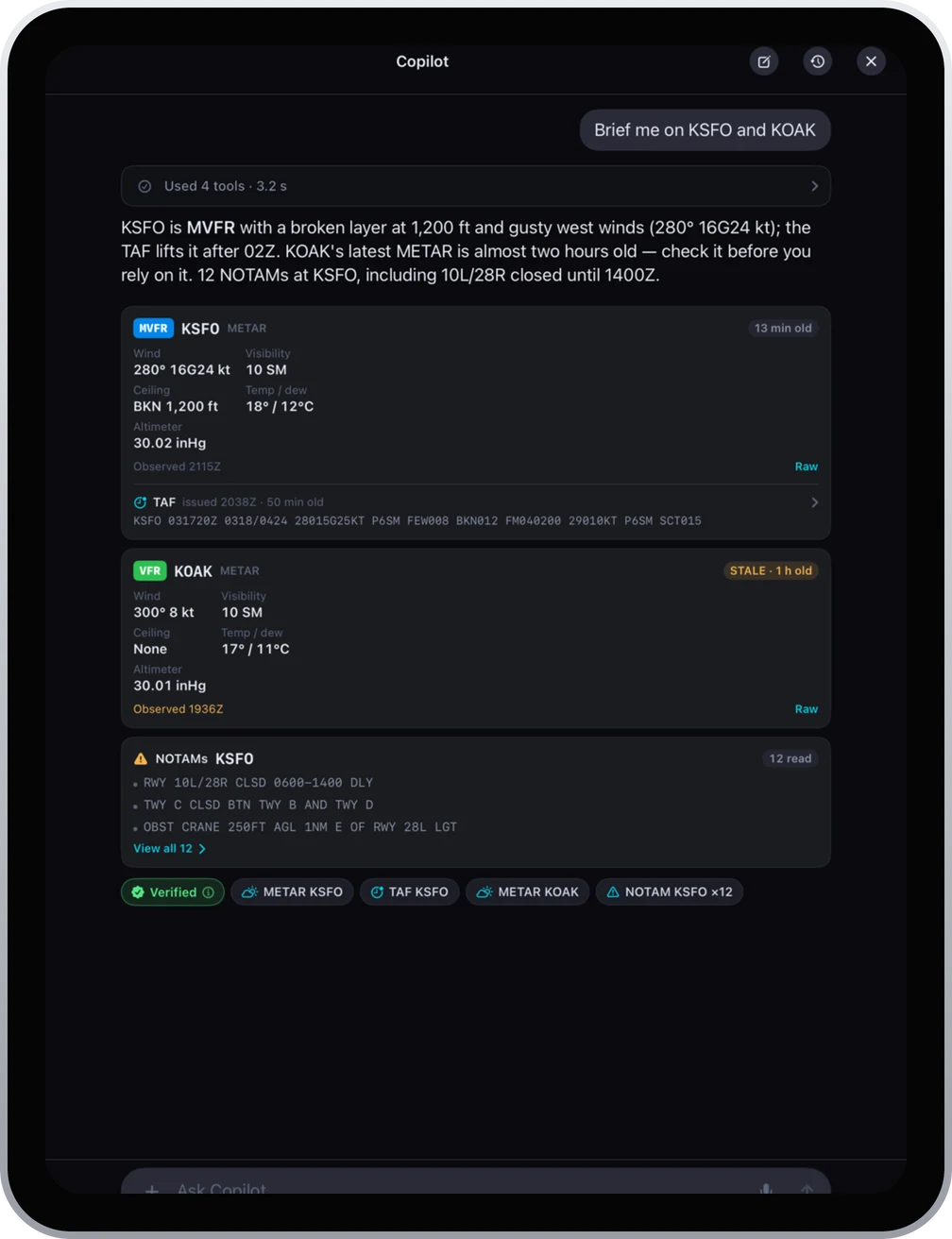 Each report carries its age. The KOAK observation is flagged stale at 1 h old.
The limits, plainly
Data freshness. The check is only as current as the METAR and TAF behind it, and forecasts miss. It does not use a METAR more than 90 minutes old, and old reports are flagged, but you still have to read the flag.
En route weather is not checked. Only the departure, destination and alternates. Convection and icing between them are on you and your briefing.
POH accuracy. A margin computed from the POH inherits its optimism. Your factor covers that. Corrections in the POH notes for grass, slope or contamination are yours to apply.
Half of PAVE is not in it. Copilot cannot know how you slept, whether you are sick, or how badly you want to get home.
It is advisory. Under 14 CFR 91.3, the pilot in command is directly responsible for, and is the final authority as to, the operation of the aircraft. A go is a comparison against numbers you chose, not a clearance.
It is beta, and it needs Pro. Ascent is $59.99 the first year, then $89.99 a year, and every registered account gets a one-time 30-day Pro trial. iPhone and iPad, iOS 18.0 or later.
Sources
- FAA, Aviation Instructor's Handbook (FAA-H-8083-9), Appendix D: Personal Minimums Checklist, read November 10, 2026
- FAA, Pilot's Handbook of Aeronautical Knowledge, chapter 2: Aeronautical Decision-Making, read November 10, 2026
- 14 CFR 91.3, Responsibility and authority of the pilot in command
- 14 CFR 91.103, Preflight action
- 14 CFR 91.151, Fuel requirements for flight in VFR conditions
- AOPA, Training and Safety Tip: Leave room for error, Kathleen Vasconcelos, October 7, 2025
- AOPA Pilot, Performance: Hopelessly optimistic, Dave Hirschman, 2019
Written by Vincent Wu, founder of Ascent EFB at Geospatios. Copilot is Beta in Ascent 1.9.6; the App Store build on November 10, 2026 is 1.8. Any EFB is a supplemental aid. Final authority rests with the pilot in command.
Try Ascent EFB
Free for 30 days, then $59.99 your first year
One plan with everything in it: 3D terrain, geo-referenced FAA charts, the full weather stack and live traffic, all cached offline. $89.99 a year after the first. One trial per account, no card needed to look around.
Start a 30-day trial