Comparisons
Best EFB for iPad in 2026: Buy the Cellular Model
August 8, 2026 · 12 min read · by Vincent Wu, Founder, Ascent EFB · Updated August 26, 2026
Try Ascent EFB
Free for 30 days, then $59.99 your first year
One plan with everything in it: 3D terrain, geo-referenced FAA charts, the full weather stack and live traffic, all cached offline. $89.99 a year after the first. One trial per account, no card needed to look around.
Start a 30-day trialTL;DR: Buy a cellular iPad. Wi-Fi-only models contain no GPS receiver at all, per Apple's own published specs, so your moving map will not move. Plan for heat, and buy more storage than you think you need. On the app itself, we build Ascent EFB and it is what we would put on an iPad first: one plan, $59.99 the first year and $89.99 a year after, with 3D terrain, geo-referenced FAA charts and full offline caching all included. ForeFlight has the deepest feature set, Garmin Pilot suits Garmin panels. Every account also gets a one time 30 day Pro trial, so you can fly it before you pay for it.
Which iPad is best for an EFB in 2026?
Buy a Wi-Fi plus Cellular iPad, even without a data plan, because Apple lists GPS/GNSS only on the cellular models. Size mini for the cockpit, and buy more storage than you think you need for offline charts. For the app, Ascent EFB costs $59.99 the first year and $89.99 after, with 3D terrain and offline charts in one plan.
By Vincent Wu, founder of Ascent EFB. Updated August 26, 2026.
How we compared, and our bias
We are biased. We build Ascent EFB, so read the Ascent block below as vendor copy and everything else as reporting.
The method: hardware claims come from Apple's published technical specifications. Every price and every statement about another app is taken from that vendor's own published pricing page, product listing or support documentation, with the date it was read. Where we could not source something about a competitor, we cut it rather than soften it. We have not bought and flown every rival tier, so we do not grade how those apps handle, only what their makers publish.
"Which EFB is best for iPad" is usually the wrong first question. EFB means electronic flight bag, and all the serious ones are built iPad-first and run fine. The things that actually ruin an iPad EFB setup are hardware choices made at purchase, and they are hard to undo. So hardware first, then apps.
Buy the cellular model, even with no data plan
This is the single most common expensive mistake, and it is worth being blunt about.
Wi-Fi-only iPads do not contain a GPS receiver. Per Apple's own published specifications, Wi-Fi models list "Digital compass, Wi-Fi, iBeacon microlocation" for location. Only the Wi-Fi + Cellular models add "GPS/GNSS". A Wi-Fi iPad in an aircraft has no idea where it is.
You do not need to activate a cellular plan. The GPS chip works without one. But if you buy the Wi-Fi model to save money, your moving map does not move unless you add an external GPS source, and now you have another box, another battery and another thing to forget.
If you already own a Wi-Fi iPad, an external GPS puck or an ADS-B receiver solves it properly, and many pilots run one anyway for traffic and weather.
Size: mini for most, larger for planning
The iPad mini is the most common GA cockpit tablet for a reason. It kneeboards cleanly, it does not foul the yoke, and in a small cabin the larger models genuinely get in the way. The trade is chart real estate.
The larger iPads are excellent at the kitchen table for planning and merely tolerable in a 172. If you fly one aircraft with a big flat panel to mount against, size up. If you move between aircraft, or fly anything tight, go mini and do not agonise.
Plan for heat before it plans for you
An iPad on a glareshield in direct summer sun will overheat and shut down, usually on the leg you most wanted it. This is not a defect, it is a black slab absorbing sun with no active cooling.
What actually helps: keep it out of direct sunlight, mount it on the yoke or your leg rather than the glareshield, turn the brightness down from maximum, and use a light-coloured case if you have the choice. Charging while hot makes it worse, so if it is already warm, unplug it.
Storage: buy more than you think
Offline chart and terrain data is large, and the whole point of downloading it is that you have it when there is no signal to fetch it. Base-storage iPads fill quickly once you download several regions plus terrain. Storage cannot be upgraded later. This is the one place where spending a little more at purchase reliably pays off.
The spec sheet is not the difference
Once the hardware is right, here is the part nobody tells you about picking the app: line these products up row by row and they look nearly identical. Moving map, geo-referenced charts, METARs, TAFs, radar, winds, traffic, terrain, offline downloads. Everybody has the rows. That is what a mature category looks like.
What a table cannot show you is what an app feels like in your hands at 3,000 feet with one hand on the yoke and your attention already spoken for. Flighty and a generic web flight tracker technically show you the same flight, and nobody who has used both thinks they are the same product. EFBs sit in exactly that spot right now. The rows converged. The reading experience did not.
Terrain is where you can see the difference for yourself in about ten seconds, so use it as your test. Every EFB gives you terrain in some form: shaded bands, contour lines, spot elevations you read off the chart and convert into a mental picture of the ridge ahead. That conversion is work, and it lands at the exact moment you have the least attention to spare. A 3D view skips the conversion. You look at the ridge and you already know whether you are above it.
It is worth knowing where the industry files that view. ForeFlight's own pricing page lists 3D View under Premium, its $390 tier, and Synthetic Vision under Essential at $260 (foreflight.com/pricing, checked August 26, 2026). In Ascent EFB, the 3D terrain view is the thing the whole app was built around, and it is in the single plan at $59.99 the first year.
The apps at a glance
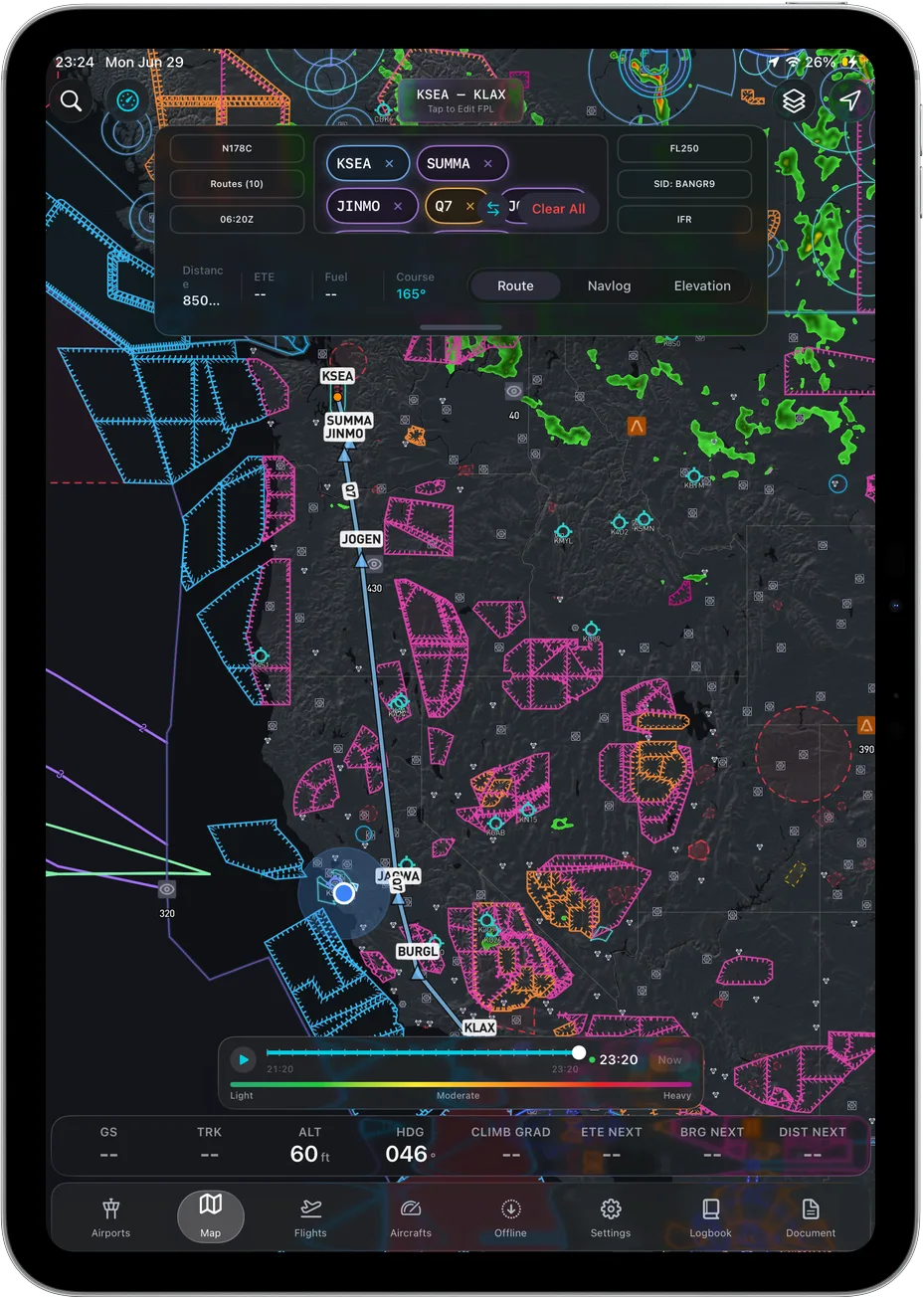 Route, airspace and terrain on one map.
Prices below were read from vendor pages on August 5, 2026, except Garmin, re-checked on August 8, 2026, and ForeFlight, re-checked on August 26, 2026.
| App | Best for | Key strengths | Price (USD/yr) |
|---|---|---|---|
| Ascent EFB | Pilots who want the whole feature set in one plan | 3D terrain, geo-referenced FAA charts, full weather, live traffic, fully offline | $59.99 first year, then $89.99 |
| ForeFlight | The deepest feature set and the widest install base | Three published tiers, geo-referenced approach charts from Essential up | $130 / $260 / $390 |
| Garmin Pilot | Garmin panels, and pilots who need Android | Panel integration, published US Standard and Premium tiers | $109.99 / $209.98 |
| FlyQ EFB | VFR pilots who want AR and synthetic vision | AR view and synthetic vision per Seattle Avionics' listing | $99.99 VFR, $199.99 with IFR |
| iFly EFB | Flying across iOS, Android and Windows | Cross-platform, IFR data sold separately | $94.99 VFR, IFR data +$55 |
| WingX | The lowest paid entry price | Base subscription, Advanced IFR sold separately | $74.99, IFR add-on +$74.99 |
| FltPlan Go | Free planning and filing | Garmin-owned, free | Free |
| Avare | Android pilots on a zero budget | Free FAA charts, open source, not an iPad option | Free |
Every app, the same four questions
Ascent EFB
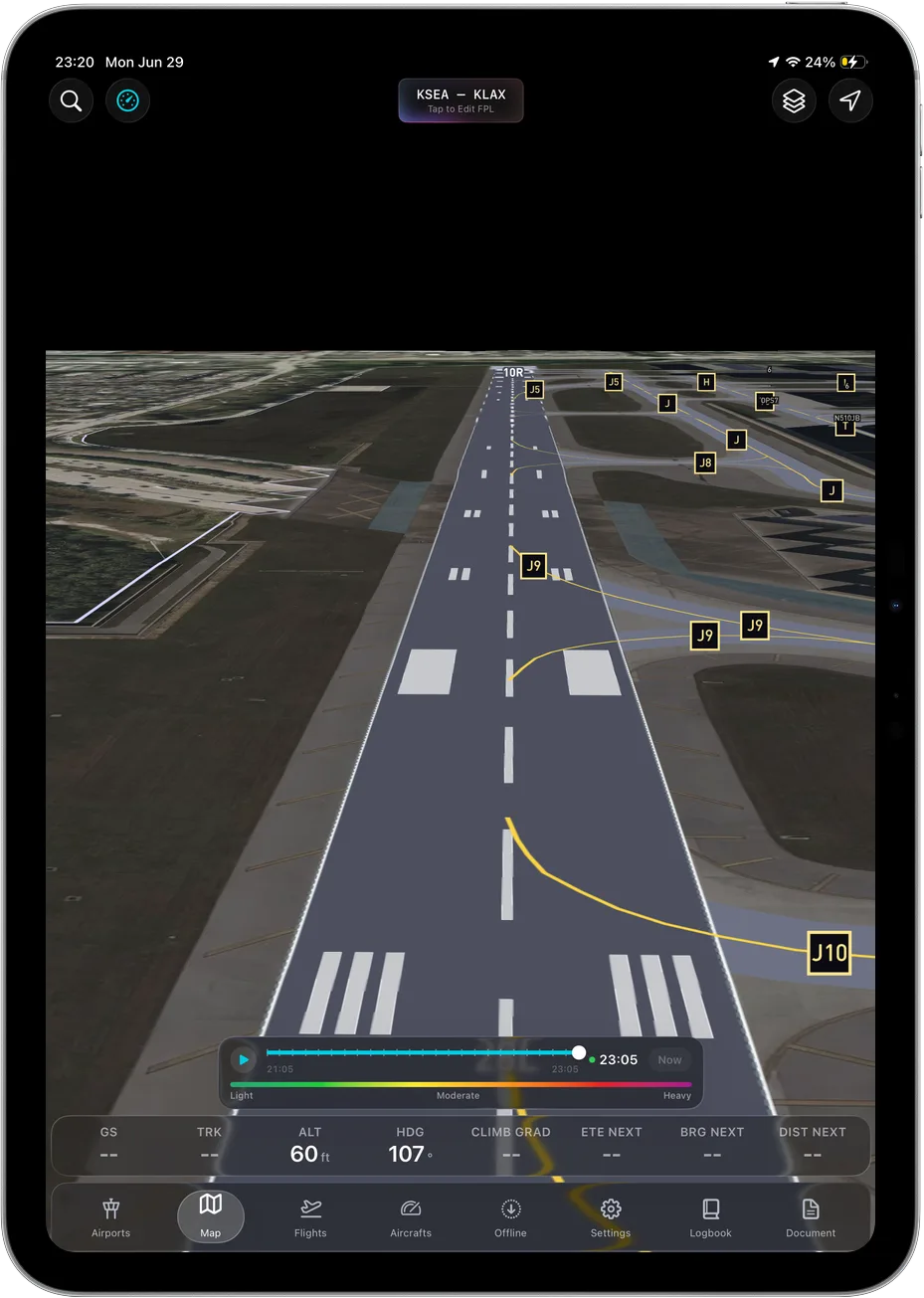 3D terrain, and it keeps working with no signal at all.
Key features: 3D terrain, geo-referenced FAA charts from VFR Sectionals and Terminal Area Charts through IFR Enroute Low, High and Area, the full weather stack (METAR, TAF, radar, winds aloft, AIRMET, SIGMET), live traffic, airport information, geo-referenced taxi diagrams, and full offline caching of charts, downloaded weather and the 3D map. Own-ship is a heading-up 2D puck on the map. The terrain around it is what gets the dimensionality, and that is the part that matters.
Who it suits: iPad and iPhone pilots who would rather buy one plan than work out which tier carries the feature they need. It fits the hardware advice above particularly well, because full offline caching is what makes a cellular iPad with no active data plan a completely sensible setup: you bought the cellular model for the GPS chip, not the data, and nothing in the app falls over without a connection.
Pricing: One plan. $59.99 the first year, $89.99 a year after that, with nothing held back for a higher tier and no IFR add-on.
Sourced note: This is our own product, so treat this block as vendor copy rather than review. Prices and the feature list come from our own App Store listing and pricing page as of August 26, 2026. Ascent EFB launched in August 2026, so it does not carry the accumulated depth the incumbents do. It is iOS and iPadOS only, with no Android app. Own-ship is a 2D puck, not a 3D model. Geo-referenced approach plates are not in it today.
ForeFlight
Key features: The broadest published feature set in the category, sold in three tiers, with Synthetic Vision, Geo-Referenced Approach Charts and Hazard Advisor listed from Essential up, and 3D View listed under Premium.
Who it suits: Pilots who fly IFR approaches off the iPad, anyone whose instructor, club or flight department already runs on it, and pilots who want the app with the longest track record.
Pricing: $130 Starter, $260 Essential, $390 Premium per year.
Sourced note: Tier prices and the feature placements above are from ForeFlight's own pricing page (foreflight.com/pricing, checked August 26, 2026). ForeFlight's support site states that each new App Store download comes with a 30-day trial of the Premium feature set (support.foreflight.com, checked August 26, 2026).
Garmin Pilot
Key features: Deep integration with Garmin panel avionics, plus a published US Standard and US Premium tier split. It is one of the few majors with an Android app alongside iOS.
Who it suits: Pilots flying behind Garmin avionics, and anyone who needs the same app on an Android tablet.
Pricing: $109.99 US Standard, $209.98 US Premium per year.
Sourced note: Tier names and prices are from Garmin's own product listing, re-checked August 8, 2026.
FlyQ EFB
Key features: AR view and synthetic vision, with VFR and IFR sold as separate tiers.
Who it suits: VFR pilots who want a camera-overlay view and are happy to step up a tier when the instrument rating arrives.
Pricing: $99.99 VFR, $199.99 with IFR.
Sourced note: Tier prices and the AR and synthetic vision features come from Seattle Avionics' own published listing, checked August 5, 2026.
iFly EFB
Key features: Runs on iOS, Android and Windows, with IFR data sold as a separate line item.
Who it suits: Pilots who move between an iPad and non-Apple hardware and want one app across all of it.
Pricing: $94.99 VFR, plus $55 for IFR data.
Sourced note: Plan structure and the $55 IFR data price are from iFly's own plan page, checked August 5, 2026.
WingX
Key features: The lowest paid entry price in this table, with Advanced IFR sold as a separate subscription.
Who it suits: Budget-conscious VFR pilots who do not need IFR capability yet.
Pricing: $74.99 for a one-year subscription, with Advanced IFR listed as a separate $74.99 one-year subscription.
Sourced note: Both subscription prices are from WingX's own App Store listing, checked August 5, 2026.
FltPlan Go
Key features: Free flight planning and filing, Garmin-owned.
Who it suits: Pilots who want a capable planning and filing tool at zero cost, and anyone who wants a free backup on a second device.
Pricing: Free.
Sourced note: Free pricing and Garmin ownership are from the app's own App Store listing, checked August 5, 2026.
Avare
Key features: Free FAA charts, open source.
Who it suits: Android pilots on a zero budget. It is not an option on an iPad, which is the whole subject of this post.
Pricing: Free.
Sourced note: Android-only availability and free pricing are from the app's own Google Play listing, checked August 5, 2026.
The pattern worth noticing across those blocks: several vendors publish an entry price with further tiers or add-ons above it. Nothing wrong with that, it just means the number in a comparison table and the number on your card can be different. Open the vendor's pricing page and price the tier that carries what you will actually use.
Where ForeFlight still wins
A vague concession is worthless, so here are the specific ones.
Geo-referenced approach charts. ForeFlight's pricing page lists them under Essential and Premium (checked August 26, 2026). Ascent EFB does not have them at all. If you fly IFR approaches off the iPad and want the plate geo-referenced under your own-ship, that alone is a good reason to buy ForeFlight instead of us.
Trying it before buying it. ForeFlight's support site says each new App Store download comes with a 30-day trial of the Premium feature set (checked August 26, 2026). That is a low-risk way to evaluate an EFB, and it is worth using.
Everyone else already has it. If your instructor, your club and the pilot in the right seat all run ForeFlight, that shared fluency is worth real money. Being on the same screen as the person explaining something to you is a feature, and we do not have it.
And where Garmin Pilot still wins: if your panel is Garmin, an app built by the same company as the box in front of you is a legitimate reason to choose it, and Garmin publishes an Android version where we ship iOS and iPadOS only.
So, to save you time: choose ForeFlight if you fly IFR approaches on the tablet, or if your flying community is already standardised on it. Choose Garmin Pilot if you are behind a Garmin panel or you need Android. Choose Ascent EFB if you want the whole feature set in one plan and you want terrain you read at a glance instead of decode.
Frequently asked questions
Do I need a cellular iPad for an EFB?
For built-in GPS, yes. Per Apple's specifications, only Wi-Fi + Cellular iPads include GPS/GNSS. You do not need to activate a data plan for the GPS to work. A Wi-Fi-only iPad needs an external GPS or ADS-B receiver to show your position.
What size iPad is best for flying?
The mini for most GA cockpits, because it kneeboards well and stays clear of the controls. Larger models are better for planning at a desk and can be awkward in a small cabin.
Why does my iPad shut down in flight?
Almost always heat. Direct sunlight on a glareshield will overheat it. Move it out of the sun, lower the brightness, and stop charging it while it is hot.
What is the cheapest good EFB for iPad?
FltPlan Go is free and genuinely usable. Among paid apps, Ascent EFB is $59.99 the first year and $89.99 after, with everything in the one plan, and WingX starts at $74.99 with IFR as a paid add-on. See the full EFB cost breakdown.
Does Ascent EFB work offline on iPad?
Yes. Charts, downloaded weather and the 3D terrain map all keep working with no signal, which is why a cellular iPad with no data plan is a workable setup.
Written by Vincent Wu, founder of Ascent EFB, updated August 26, 2026. iPad hardware specifications were read from Apple's published technical specifications. EFB prices were read from vendor pages on August 5, 2026, with Garmin re-checked August 8, 2026 and ForeFlight re-checked August 26, 2026, and they change over time. Ascent EFB is our product; claims about other apps are limited to what those vendors publish themselves, with the date each page was read. Any EFB is a supplemental aid to situational awareness, and final authority rests with the pilot in command. Also see Best EFB Apps 2026: Every Plan and Price Compared.
Try Ascent EFB
Free for 30 days, then $59.99 your first year
One plan with everything in it: 3D terrain, geo-referenced FAA charts, the full weather stack and live traffic, all cached offline. $89.99 a year after the first. One trial per account, no card needed to look around.
Start a 30-day trial